

How to Use Cash Captain
A guided tour of Cash Captain's fastest features: type to track transactions, an at a glance home screen, unified accounts, and budgets you can share with a partner.
By GN Media
Cash Captain is a personal finance app built around three ideas: simplicity, effortless fast tracking, and shared finances. Managing your money shouldn't feel like a chore, so the app keeps you on top of your spending without piling on features or complicated workflows.
Instead of filling out forms and tapping through multiple fields, you simply type what you spent or earned, like "Lunch 250" or "Salary 50k", and Cash Captain turns it into a transaction with smart parsing. This guide walks through the app's main screens so you know what to expect the first time you open it.
Quick summary
In this guide, you will see how to:
Log a transaction in seconds with Quick Entry.
Read your finances at a glance on the Home screen.
See everything you own across accounts, banks, and currencies.
Build a budget around how you actually spend.
1. Log a transaction in seconds
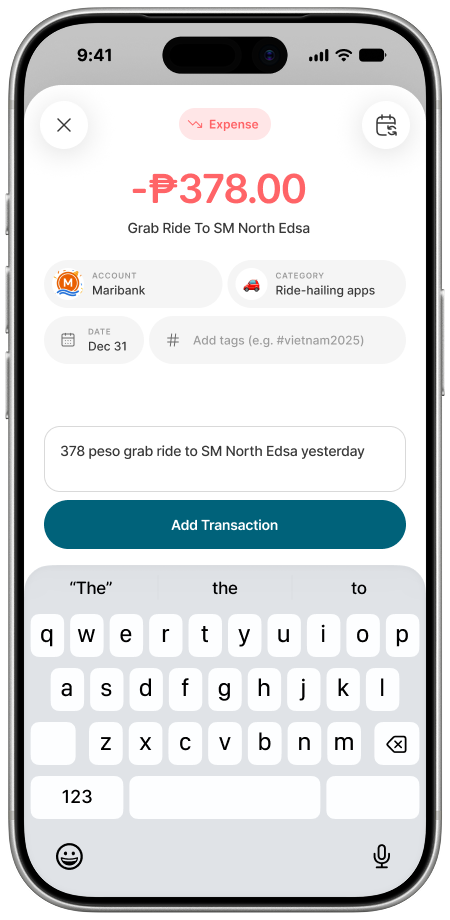
Quick Entry is Cash Captain's fastest way to track money. Type a transaction the way you'd naturally describe it, and the app automatically picks up the amount, category, date, and other details, so tracking takes seconds instead of tapping through separate fields.
Once the details look right, tap Add Transaction. You can always go back and adjust the account, category, or tags before saving.
2. Check your day at a glance
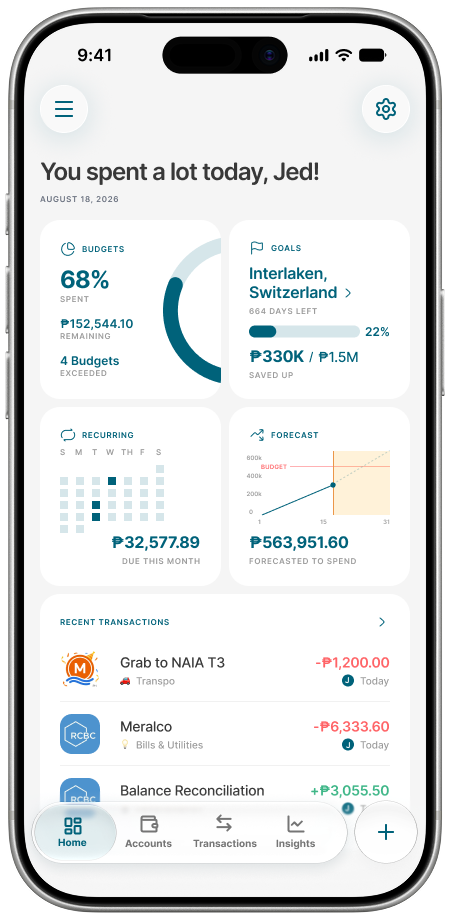
The Home screen distills your financial life into what matters today: budgets and how much you have left, upcoming recurring expenses, savings goals, and a spending forecast, without overwhelming you with raw numbers.
Tap into any card (Budgets, Goals, Recurring, or Forecast) to see the full breakdown behind the summary.
3. See everything you own
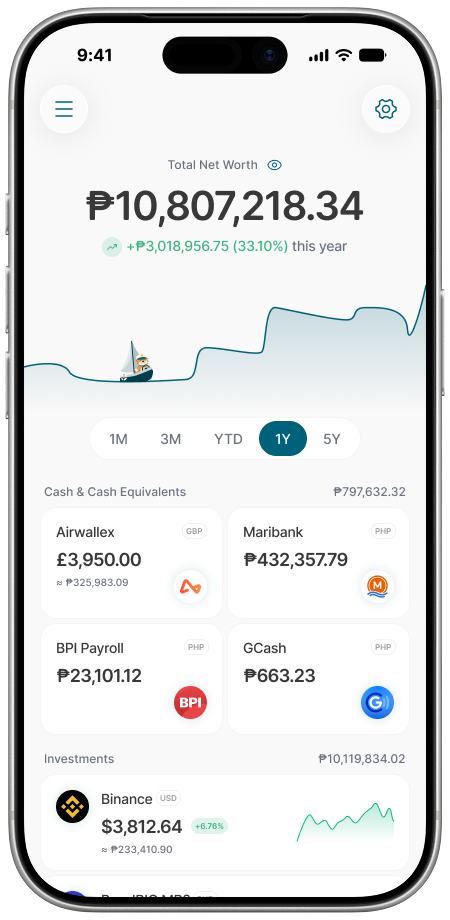
The Accounts screen brings your cash, bank accounts, investments, and different currencies together in one place, so you get a clear picture of your net worth instead of checking each app separately.
Switch the time range above the chart (1M, 3M, YTD, 1Y, or 5Y) to see how your net worth has moved over a shorter or longer stretch.
4. Build a budget that fits how you spend
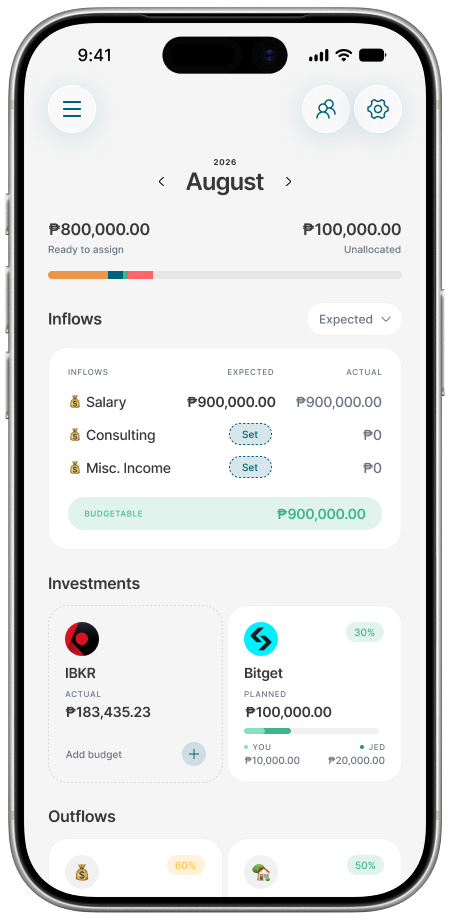
Budgets let you decide where your money should go, keep track of what's left, and build around how you actually manage your finances, rather than adapting to a rigid system.
Inflows and outflows are tracked separately, so you can see expected income against actual income before deciding how the rest of the month's budget gets allocated.
Managing money together
Finances aren't always individual. Cash Captain lets you manage money together with a partner, budget household expenses, and work toward shared financial goals, using the same Budgets and Home screens above, shared between two accounts instead of one. Simple to use, fast to track, easy to share.
Where to get help
Cash Captain doesn't run other social accounts yet. The Cash Captain Facebook group is where the team posts updates and takes questions, and you can also reach the team directly at hello@cashcaptain.app.
GN Media has a referral partnership with Cash Captain and may earn a commission if you sign up through links in this guide. This material is for information only and is not financial advice.